Music Player - MP3 & Playlists
- 4.4
- Rating
- 5.00M
- Installs
- Free
- Price

 Analysis by App-foxy
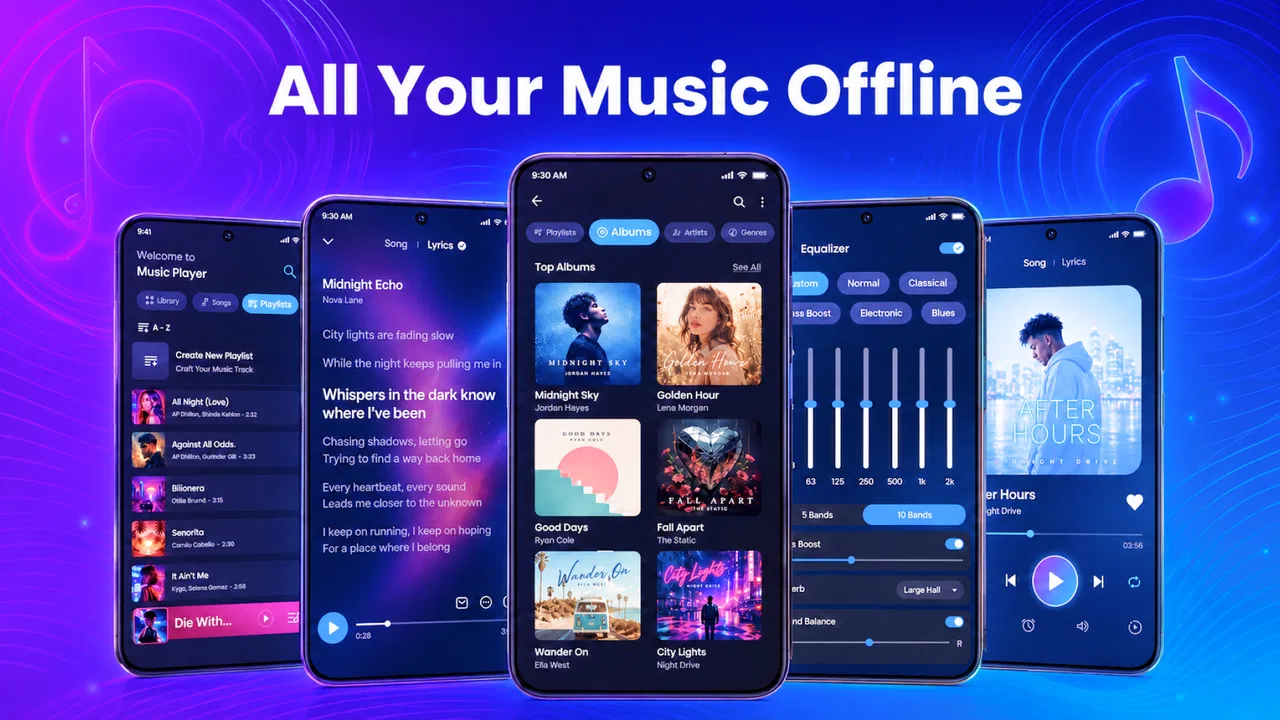
I approached Play Song Offline Music Player as the kind of Music & Audio app you keep on your phone for straightforward listening rather than as a complete streaming service. Its main appeal is clear: it is built around playing songs stored on the device, with an equalizer and lyrics available alongside the player. That makes it interesting for anyone who already owns an MP3 collection and wants more control than a basic file-opening screen provides.
In my experience, the most important question is not whether it can replace every music app. It cannot. The better question is whether you want a local player that lets you listen without depending on a connection. If your answer is yes, this free app from EAGLE APPS deserves a closer look. It has reached over one million installs, which suggests that the offline-player idea still solves a real everyday problem.
How the player feels during ordinary listening
The first impression is shaped by the app’s focused purpose. You are not opening it to discover a huge online catalog, follow artists, or manage a social profile. You are opening it to reach music already available on your phone and start listening. That narrower approach can feel quicker simply because there is less to navigate than in a full streaming platform.
You May Also Like

 Blood Strike: 2.5 Anniversary
Blood Strike’s Loadouts Turn Every Drop Into a Tactical Gamble
A close look at Blood Strike’s custom loadouts: how fast access to signature weapons reshapes its battle royale rhythm, rewards preparation, and narrows the gap between fights.

 Pandora - Music & Podcasts
Pandora’s Music Is Easy to Start, but Harder to Recover
Pandora’s strength is its low-effort path from a seed to a station. Its weak spot is how much confidence it asks you to place in connection, setup, and quiet recovery.

 8 Ball Pool
 Is Built on Rivalries, Rematches, and Routine
A close look at the rivalries, rematches, shared routines, and unanswered safety questions that turn a quick pool match into a persistent mobile community.

 Samsung Music
’s Quiet Strength Is Playing What You Already Own
Its reach comes less from spectacle than from dependable access to a personal library. That simplicity is both the app’s strongest retention engine and its ceiling.

 AccuWeather: Weather Radar
AccuWeather Review: A Quick, Clear Forecast for Everyday Decisions
For everyday plans, the best forecast is the one you can understand quickly. AccuWeather makes rain timing, radar, and local conditions easy to act on, with a few trade-offs.

 Hill Climb Racing
Why Hill Climb Racing Still Turns Crashes Into One More Run
A tiny car, a bumpy hill and one more upgrade: Hill Climb Racing keeps resurfacing because its simple chaos makes every near-miss feel personal.
More From Our News Desk



For a normal commute, a walk, or background music while working, this kind of design makes sense. I can imagine opening the player before leaving home, choosing an album or a familiar track, and then putting the phone away. Offline playback is especially useful on underground transport, in places with unreliable reception, or when you want to avoid using mobile data.
The app’s store summary also points to a built-in equalizer and lyrics. Those additions matter because they move it beyond a barebones folder browser. The equalizer gives listeners a way to adjust the character of their music instead of accepting one fixed sound, while lyrics can make the player more useful when you want to follow along or understand a song better.
That said, I would keep expectations realistic. An equalizer is helpful only if you are willing to spend a little time adjusting it, and lyrics are most valuable when they are available and displayed correctly for the track. Neither feature turns a local player into a professional audio workstation. Their value is in convenience, not complexity.
What affects the sense of speed
Because the app is designed for local music, the listening experience should depend more on the phone’s storage and music library than on a remote service. Starting a song does not require waiting for a stream to buffer, and that is the biggest practical speed advantage over many online alternatives. Once your tracks are properly stored, the basic routine is refreshingly direct.
The trade-off appears before playback. A local player is only as convenient as the music collection it can see. If your files are scattered across folders, have inconsistent names, or lack useful artwork and tags, browsing may feel less polished than opening a streaming app and searching by artist. I would organize the library first rather than blaming the player for a messy collection.
A useful habit is to prepare a few listening groups before a trip: albums for longer journeys, a short selection for commuting, and slower tracks for evening listening. This reduces the need to search repeatedly and makes the offline design feel intentional rather than like a compromise.
When the phone is under heavier use
The most demanding everyday situation is not simply playing one song. It is playing music while the phone is also handling navigation, messaging, downloads, photography, or other active tasks. In that setting, a local player has one natural advantage: it does not need to maintain a music stream. That can make it a sensible companion for a long drive or a day away from dependable connectivity.
I would still avoid assuming that every phone will behave identically. Audio playback is affected by the device, its operating system, storage condition, and whatever else is running in the background. If music stops after another app takes over audio, the first troubleshooting step is to check which app has claimed playback rather than immediately reinstalling the music player.
There is also a practical battery trade-off. Offline playback avoids the radio activity associated with streaming, but the phone is still doing work, especially if you keep the screen on, browse lyrics, or frequently change equalizer settings. For the best endurance, I would start a playlist, lock the screen, and use wired or already-paired wireless audio equipment as appropriate.
Large personal libraries create a different kind of heavy-use moment. Scanning a phone containing years of downloaded music can be less immediate than opening a small collection. I would give the app time to recognize the library after adding many files, then use consistent tags and filenames going forward. That workflow is more reliable than repeatedly moving files around while expecting the catalog to update instantly.
Reliability in a real daily routine
For me, reliability in an offline player means three things: the music is available when I need it, playback does not depend on a signal, and recovery after an interruption is uncomplicated. Play Song Offline Music Player is aimed at the first two points. A locally stored track is a much safer choice than a stream when you are about to enter an area with poor reception.
Recovery deserves a little attention. If playback pauses because of a call, an alarm, another media app, or an accidental control press, I would first return to the player and use its playback controls rather than reopening the track from a file manager. Keeping one music app responsible for audio at a time also reduces confusing handoffs.
When a song does not appear, the likely practical causes are library organization or file availability. I would confirm that the track is actually stored on the device, check whether it was moved after the app scanned it, and then refresh the library if that option is available in the interface. This is a more useful approach than expecting an offline player to locate music that exists only in a cloud account.
The current release is version 1.0.38, so I see it as a relatively focused product rather than a mature ecosystem with years of accumulated tools. That is not automatically negative. A smaller scope can make the app easier to understand, but users who expect elaborate sorting, advanced synchronization, or extensive desktop-style management may find the experience limited.
Android compatibility and practical device limits
The app supports Android 7.0 and later, which covers a broad range of phones and tablets. That makes it approachable for people using older hardware who may not want to install a demanding streaming service. Still, compatibility does not mean every device will offer the same experience. Older phones can have slower storage, less available memory, or more aggressive background restrictions.
If playback stops when the screen locks, I would inspect the phone’s battery-saving settings and background controls. Some Android devices are unusually strict about pausing apps that are not visible. That kind of interruption can look like an app failure even when the player itself is functioning normally. Allowing the player to operate in the background, where the device provides that control, is a sensible adjustment.
Storage is another constraint that is easy to overlook. Offline listening requires the music files to remain on the phone, so a device with limited free space may force difficult choices between music, photos, videos, and other apps. I would keep only the albums I actually listen to and remove duplicates before importing more tracks.
There is also a difference between an older phone being able to run the app and being comfortable for library management. Playing one local song may be simple, while searching through a very large collection, displaying lyrics, and changing settings repeatedly can feel less fluid. For a modest library, that distinction probably will not matter. For a huge archive, it should influence your expectations.
Equalizer and lyrics: useful extras with specific limits
The equalizer is the feature I would explore after confirming that basic playback works well. Rather than immediately pushing every slider to an extreme, I would make small changes and test them with several kinds of music. A setting that makes electronic tracks feel more energetic can make voices harsh or acoustic instruments thin. The best adjustment depends on both the recording and your headphones or speaker.
This is also where personal taste matters more than technical labels. Someone using inexpensive earbuds may appreciate a modest change in bass or vocal presence, while a listener with carefully tuned headphones may prefer to leave the sound close to its original balance. The equalizer is therefore a useful option, not a reason to alter every song.
Lyrics add a different kind of value. They are handy when I want to sing along, identify a line, or stay engaged with an unfamiliar track. They are less important when the app is being used purely as background audio. I would treat lyrics as a welcome companion feature rather than the central reason to choose the player.
A good workflow is to use the equalizer for the listening setup, not for individual moments. If you are switching between headphones, a car system, and a small speaker, separate adjustments may make sense. If you are constantly changing the sound after every song, the feature is adding friction instead of improving the experience.
Who will get the most from it
I think the strongest audience is people with a personal MP3 collection who want a simple way to listen away from the internet. It also suits travelers, commuters, students with limited data, and anyone who prefers to keep selected music available without maintaining an online subscription. The Everyone content rating makes it suitable for a broad audience, although the actual music played through it naturally depends on the listener’s own files.
Consider a realistic weekend scenario. Before leaving for a rural area, I could copy a few albums to the phone, check that they appear in the library, choose a comfortable equalizer setting, and test playback with the screen locked. That short preparation is worthwhile because it removes the uncertainty of finding a signal later. If I also want lyrics, I would check them before the trip rather than waiting until I am offline.
The app is less convincing for someone whose entire collection lives inside a streaming service. If you mainly search for new releases, rely on cloud playlists, or want recommendations to shape your listening, a streaming platform is likely the better fit. Play Song Offline Music Player is not trying to replace that discovery model; its strength is control over music already stored locally.
It may also be a poor match for users who need seamless synchronization across several devices. A local library is convenient on the phone where it resides, but it does not automatically provide the same experience everywhere. If your priority is moving between a phone, tablet, computer, and smart speaker without thinking about file locations, a cloud-centered service will usually be more convenient.
How it compares with common alternatives
Compared with a basic phone file manager, this app offers a more music-focused environment. A file manager can open an audio file, but it is not usually where I want to spend time adjusting sound or following lyrics. The dedicated player makes repeated listening feel more natural and keeps music tasks together.
Compared with a full streaming service, the advantage is independence from a connection and from a constantly changing catalog. You decide what is on the phone, and your listening is not interrupted by weak reception. The disadvantage is that you must manage the files yourself and accept that discovery, cloud access, and cross-device continuity may be weaker.
Compared with a more advanced specialist music player, the decision comes down to how much control you need. Play Song Offline Music Player looks more appealing to someone who wants the essentials plus an equalizer and lyrics without turning music management into a technical hobby. A specialist alternative may be preferable if you need unusually detailed library rules, extensive format handling, or a highly customized playback workflow.
Price also changes the calculation. The app is free to install, but in-app purchases range from around fourteen dollars to fifty dollars per item. I would inspect the purchase screen carefully before committing to anything and decide whether the free experience already covers my needs. For a simple offline routine, paying is worthwhile only if the additional value is clear to you.
My performance verdict
After weighing the use cases, I see Play Song Offline Music Player as a practical local-listening tool rather than an all-purpose music platform. Its perceived speed should be strongest when the library is organized and the songs are already on the device. Its offline focus is useful during travel and weak-signal situations, while the equalizer and lyrics give it more personality than a minimal playback utility.
The main friction comes from the responsibilities that local music always brings: keeping files available, maintaining a sensible library, and working around device-specific background restrictions. Those are not reasons to dismiss it, but they are reasons to prepare the phone properly. A few minutes spent organizing albums and testing locked-screen playback can prevent most avoidable frustration.
With a 3.9 average from around 1.7 thousand ratings and 19 written reviews, the public response is mixed rather than universally enthusiastic. I would read that as a reminder to judge the app against your own listening habits. It is free, rated for Everyone, and available for Android devices running version 7.0 or newer, so trying it with a small music collection is a low-risk way to see whether its workflow suits you.
My recommendation is straightforward: choose it if offline MP3 playback, a built-in equalizer, and lyrics are the combination you actually need. Skip it if your music life depends on streaming discovery, cloud synchronization, or elaborate multi-device management. For the right listener, its focused design can feel faster and more dependable than a larger service, especially when the internet is the problem rather than the solution.
FAQs for Music Player - MP3 & Playlists
01What features does Play Song Offline Music Player offer?
Play Song Offline Music Player provides users with the ability to listen to their favorite tracks without an internet connection. It supports various audio formats and offers playlist creation, equalizer settings, and customizable themes. Users can also organize their music library efficiently and enjoy gapless playback for uninterrupted listening.
02Is Play Song Offline Music Player compatible with both Android and iOS devices?
Yes, Play Song Offline Music Player is available for download on both Android and iOS platforms. The app is optimized for performance on various devices, ensuring a seamless experience whether you're using a smartphone or tablet. Check the app store on your device for compatibility with your specific model.
03Does Play Song Offline Music Player require any subscription or in-app purchases?
Play Song Offline Music Player offers a free version with basic features. However, to unlock premium functionalities such as advanced equalizer settings, ad-free experience, and additional customization options, users may opt for in-app purchases or a subscription plan. Check the app’s description for detailed pricing information.
04How does Play Song Offline Music Player manage music files?
The app scans your device for music files and automatically organizes them into a library by artist, album, and genre. You can also manually create and edit playlists. The app’s intuitive file management system allows for easy navigation and quick access to your favorite tracks without needing an internet connection.
05Is my data safe while using Play Song Offline Music Player?
Yes, Play Song Offline Music Player operates offline, meaning it doesn’t require internet access to function, ensuring your data remains secure. The app doesn’t collect personal information without consent, and any permissions requested are solely for enhancing the user experience. Always review the privacy policy for detailed information.
Pros
- User-friendly interface with intuitive navigation.
- Supports a wide range of audio formats.
- Allows easy creation of custom playlists.
- High-quality sound output and equalizer.
- Works seamlessly without internet connection.
Cons
- Limited features compared to premium apps.
- Ads may interrupt the user experience.
- No built-in lyrics display feature.
- Lacks cloud storage integration.
- Occasional bugs on older devices.

Music Player - MP3 & Playlists
Gallery